
You’ve got old blog posts pulling steady search traffic, and you want to monetize them. Smart. The scary part is what happens when you touch a page that Google already “understands”.
The goal isn’t to sneak links in. It’s to add affiliate links in a way that keeps the page’s purpose the same, improves the reader’s experience, and leaves a clean trail of what changed and why. Think of it like renovating a kitchen without moving the walls.
Below is a safe update workflow you can repeat as part of your affiliate marketing strategy, plus simple QA and monitoring so you can catch problems early.
Pick the right posts first (and protect search intent)
Not every old blog post is a good candidate. The biggest ranking drops usually happen when a page’s intent shifts, even if the edit feels small.
Start by choosing posts that already match an affiliate offer without needing a rewrite, particularly those ranking for buyer-intent keywords. If the article is “how to clean a coffee maker,” an affiliate link to a descaling solution fits naturally. A sudden “best espresso machines” block changes the vibe, and can change what Google thinks the page is about.
A quick filtering approach that works well in your content audit:
- Posts generating steady organic traffic for at least 28 to 90 days.
- Posts ranking in positions 3 to 20 (they’re close enough to benefit, but stable enough to measure).
- Posts with clear “recommendation moments” already in the copy (tools you mention, products you suggest, resources you reference), perfect for serving your niche audience.
Skip these until you have more experience:
- Posts with fresh volatility (big position swings week to week).
- Posts tied to breaking news, coupons, or short-lived promos.
- Pages that already look heavy on monetization (unlike general informational posts, product reviews can tip into “thin affiliate” territory).
Before you add anything, read the post like a first-time visitor. What problem is it solving? What would a reader expect next? That expectation is your guardrail.
If you need inspiration for refresh ideas that don’t change intent, skim blog update ideas for affiliate content. The best updates usually make the post clearer, not “more salesy”; add them to your content calendar.
Use a safe update workflow (so every edit is controlled)
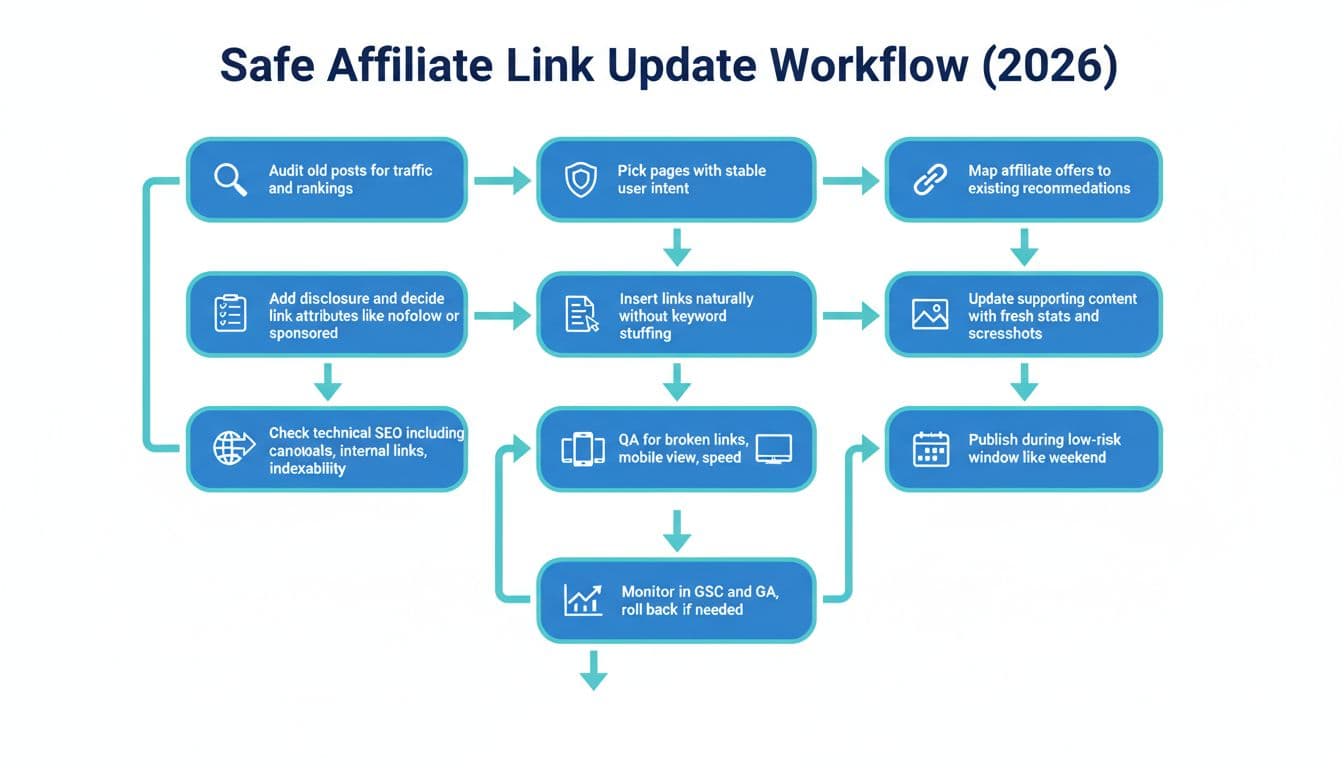
Treat affiliate edits like a mini-release. You want a baseline, a change log, and a rollback plan. That’s what keeps “quick monetization” from turning into a months-long traffic dip.
Pre-update checklist (do this before touching the post)
- Benchmark performance: In Google Search Console and Google Analytics, note top queries, clicks, impressions, average position, and CTR for the last 28 days.
- Capture the current version: Save the existing copy somewhere (doc export or revision history), and double-check the post slug and permalink structure to avoid any URL changes that could create broken links.
- Decide the offer mapping: For each new affiliate link, write one sentence explaining how it helps the reader at that exact point in the post, such as on resource pages.
- Choose your linking method: Direct-to-merchant URLs are fine, but branded redirect links can be easier to manage long term, especially with a WordPress plugin for link management.
- Plan tracking: If you use UTM parameters, keep them consistent and minimal. Don’t stack messy parameters that look suspicious to users. Also, update the last updated date as a content freshness signal.
Redirects and tracking without headaches
If you use affiliate redirects (like yoursite.com/go/tool-name), keep them boring and stable:
- Use 301 redirects (permanent) for affiliate “go” links.
- Don’t change redirect destinations repeatedly on a top-ranking post, and always verify the permalink structure and post slug remain intact. If you must swap merchants, do it gradually and document the change with 301 redirects.
- Avoid redirect chains (A to B to C). One hop is enough.
And one more rule that saves pain later: don’t update 50 posts in one afternoon. Roll out in batches so you can spot patterns.
For a practical walkthrough of updating older posts while adding monetization, see how to update blog posts for SEO and add affiliate links. Use it as a reminder to refresh content around the link, not just drop links in.
Add affiliate links naturally (examples, disclosures, and link attributes)

The safest affiliate insertions feel like a helpful reference, not a pitch. Natural placement boosts conversion rates by guiding readers smoothly to the next step while keeping your content trustworthy.
Natural vs spammy insertions (realistic examples)
Natural affiliate links (fits the sentence’s purpose):
“I like using a simple password manager so I’m not reusing logins, I’ve had good results with [Tool Name] for that.”
Spammy affiliate links (changes intent and looks manipulative):
“Best password manager 2026 is [Tool Name] password manager, click best password manager deal now.”
A good rule: if the anchor text reads awkwardly out loud, rewrite it.
How many links is too many?
There’s no magic number, but readers can feel when a post becomes a billboard. For most informational posts, start with 1 to 3 affiliate links total, placed where the reader would naturally want an option. If the post is long, you can add a few more (consider product displays or call-to-action buttons for cleaner visual integration), but keep the “helpfulness density” high.
Avoid these common risk factors:
- Exact-match anchors over and over (“best cheap hosting”, “best cheap hosting”, “best cheap hosting”).
- Multiple affiliate links in one sentence.
- Adding a big “Top Picks” block above the fold on a previously informational post.
- Replacing existing helpful outbound citations with affiliate links.
- Heavy monetization that hurts social share counts in online communities.
Disclosure language and placement (simple and safe)
Put a short affiliate disclosure before the first affiliate link or near the top of the post, where a reader will see it without hunting. Keep it plain:
“I may earn a commission if you buy through links in this post, at no extra cost to you.”
If you have a site-wide disclosure page, link to it once, but don’t bury the disclosure only in the footer.
rel="sponsored" and nofollow in 2026
For affiliate links, use the sponsored tag rel="sponsored" as the default. Many sites also include nofollow alongside it (for example rel="sponsored nofollow"). The main point is to clearly label paid relationships.
If you’re unsure how link attributes fit into affiliate SEO, Affiliate Links & SEO: a complete guide offers a solid explanation you can share with a writer or VA doing the edits.
Publish-day QA and post-publish monitoring (catch issues early)

Publish-day QA checklist (10 minutes per post)
- Confirm the disclosure is visible near the first affiliate link.
- Click every affiliate link on mobile and desktop with a WordPress plugin for automated broken link checking.
- Check redirects (one hop, correct destination, no 404s).
- Review meta descriptions to ensure they align with new links and content.
- Scan for accidental keyword stuffing after edits.
- Make sure headings and intro still match the query intent.
- Verify the page is indexable (no accidental noindex, canonical unchanged).
- Confirm page speed didn’t crater (huge tables, new scripts, heavy images).
Post-publish monitoring checklist (14-day window)
- Watch Google Search Console daily for 3 to 5 days while tracking performance, then every few days.
- Compare performance to the 28-day benchmark, not just yesterday, focusing on buyer-intent keywords in top queries.
- Monitor user engagement metrics and social share counts to gauge reader response.
- If you see a sharp drop, note how search engines react to edits and revert the most aggressive change first (often anchor text, link count, or a new “money” section); consider if deeper product reviews are needed.
- Use a WordPress plugin to double-check for broken links during tracking performance.
A simple metrics dashboard to track
| Metric | Where to check | Why it matters |
|---|---|---|
| Top queries | Search Console | Confirms you didn’t drift from intent |
| Avg position | Search Console | Early warning for ranking loss |
| CTR | Search Console | Titles and meta descriptions can react to “salesy” edits |
| Clicks and impressions | Search Console | Separates demand changes from ranking issues |
| Bounce rate / engagement | Analytics | Flags mismatched intent, poor user engagement, or annoying link placement |
| RPM / revenue per session | Analytics | Ties to conversion rates and tells you if monetization is working without more traffic |
| Affiliate outbound clicks | Analytics or link tool | Measures if link placement is natural and visible |
| Conversion rate | Affiliate platform | Confirms the offer fits the audience and tracks conversion rates effectively |
Conclusion
Updating old blog posts can feel like touching a Jenga tower, but it doesn’t have to. Keep intent steady to serve your niche audience, add links where a reader wants the next step, and use controlled batches with clear benchmarks. If you build the habit of QA and monitoring, this affiliate marketing strategy lets you add links without gambling your rankings. Schedule regular checks in your content calendar, share refreshed posts in online communities, and update resource pages for extra growth. Which post in your archive already recommends something helpful, even before you add the link?