
You send a click to a merchant, the shopper buys later, and you expect a commission. Then nothing shows up. Often, the reason is the cookie window.
A cookie window is basically the timer that decides whether you get credit when someone buys. Pick the wrong programs (or promote the wrong offers for your audience), and you can do real work and still lose the sale.
This guide breaks down cookie windows in plain terms, shows how attribution rules change the outcome, and helps you choose offers that fit how your audience buys.
What a cookie window is (in plain English)
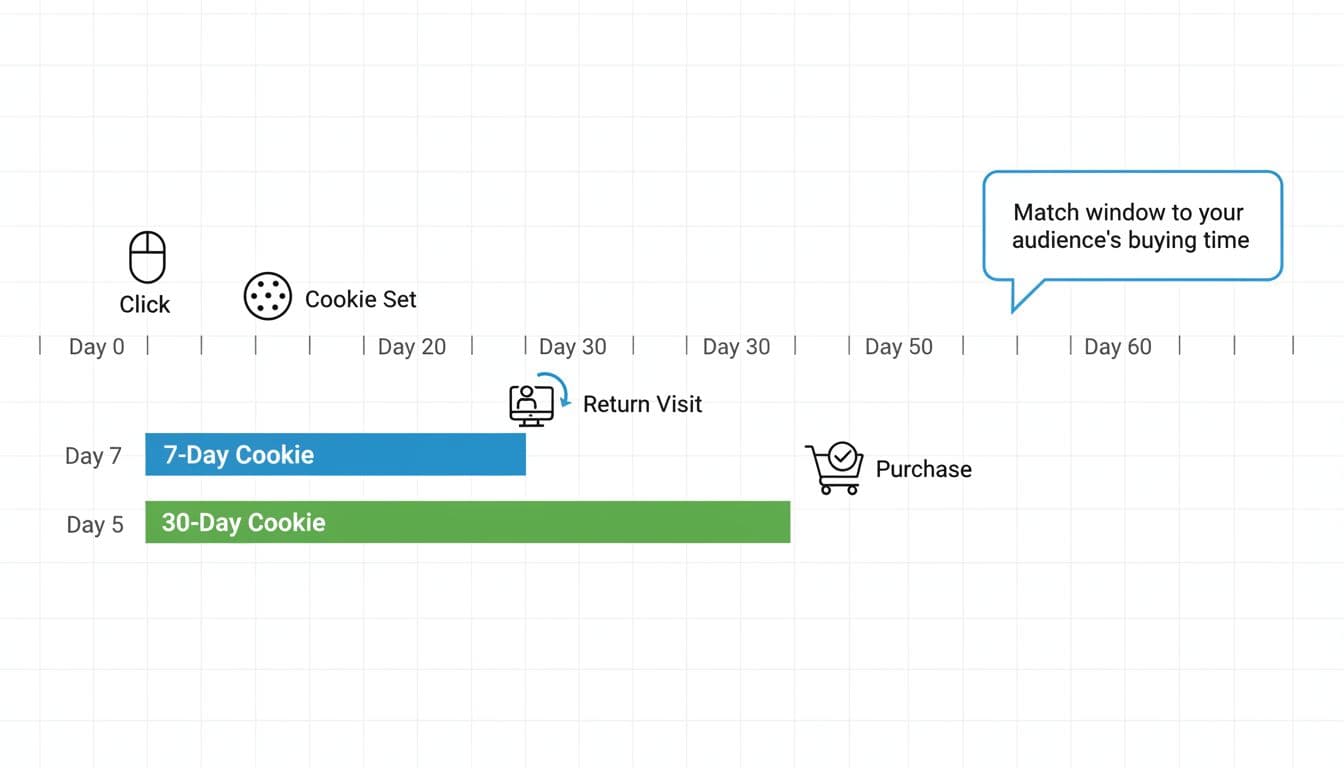
A cookie window is the time period after a person clicks your affiliate link where their purchase can still be credited to you.
Think of it like a claim ticket. The click gives the shopper a ticket with your name on it, and the cookie window is how long that ticket stays valid. If they buy after it expires, the sale may not be attributed to you.
Two details matter right away:
- The window starts at the click (or sometimes at the first visit).
- The window applies only if tracking still works (browser limits and consent can interfere, more on that later).
Affiliate platforms often call this an attribution window or tracking window. Refersion’s explainer gives a clean definition of an attribution window and why it exists: What is the Attribution Window?
Cookie window length is only half the story (attribution rules decide the rest)
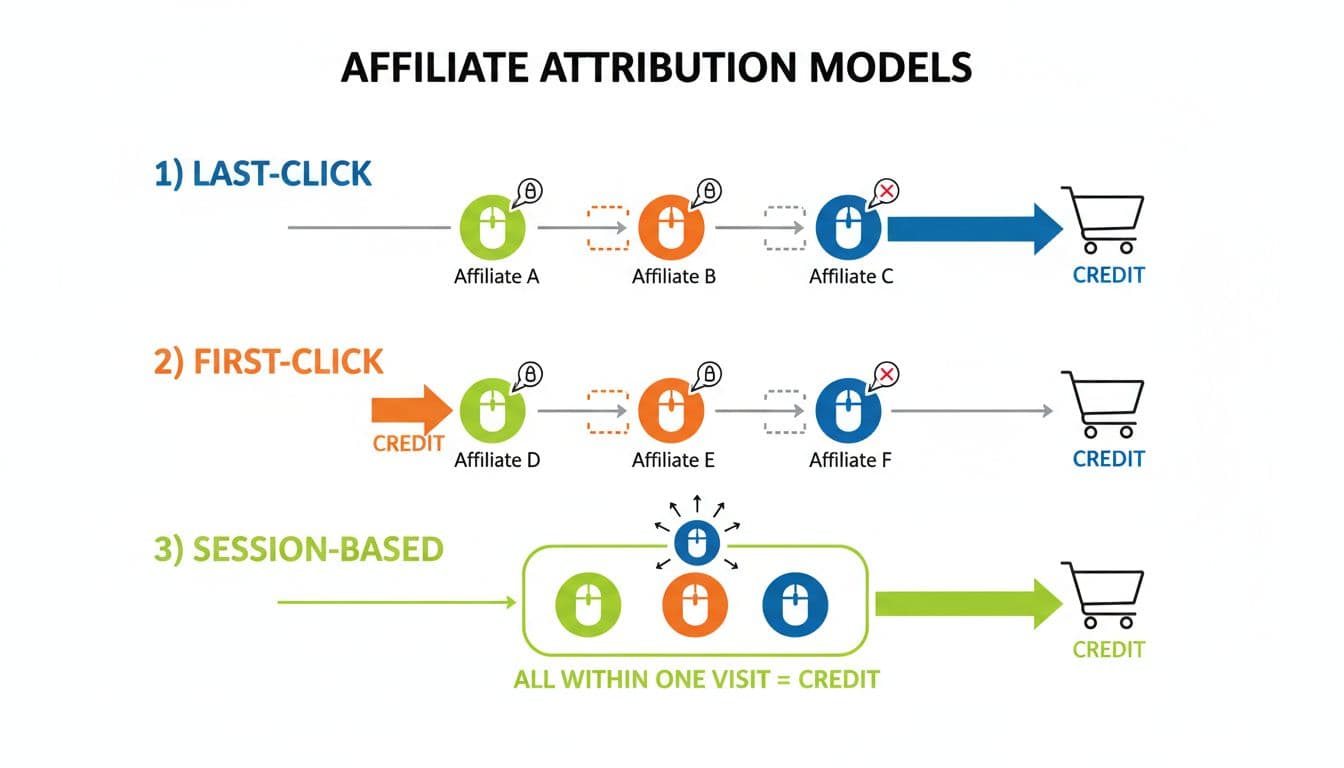
A longer cookie window can help, but it doesn’t guarantee you get paid. The attribution rule decides who gets the commission when multiple touchpoints happen.
Most affiliate programs still use some form of last-click attribution. That means the most recent eligible referral before purchase gets credit, even if you started the customer journey.
This is where “overwrite” comes in. If the shopper clicks someone else’s link later (a coupon site, a review page, a paid ad), your tracking can be replaced.
If you want a deeper view of how models affect payout outcomes, the Performance Marketing Association has a useful overview here: How Attribution Models Affect an Affiliate Program
Glossary (quick definitions you’ll actually use)
Cookie window: The time after a click when a purchase can still be credited to you.
Attribution: The method used to assign credit for a conversion.
Overwrite: When a later click replaces an earlier affiliate’s tracking.
Session: A single visit period; if the user leaves and returns later, it’s a new session.
Last-click: The last eligible referrer gets credit.
Assisted conversion: You influenced the sale, but you weren’t the final credited click.
Worked examples (simple math, real outcomes)
These examples assume a program with last-click attribution unless stated.
Example 1: 24-hour cookie, quick buyer, you get paid
- Click: Jan 3, 2:00 PM
- Purchase: Jan 4, 10:00 AM
- Time passed: 20 hours
Result: Credited (20 < 24 hours)
If your commission is $20 per sale, you earn $20.
Example 2: 7-day cookie, normal research, you lose credit
- Click: Jan 3
- Purchase: Jan 12
- Time passed: 9 days
Result: Not credited (9 > 7 days)
Even if the buyer came from your content, your earnings are $0.
Example 3: 30-day cookie, longer consideration, you get paid
- Click: Jan 3
- Purchase: Jan 25
- Time passed: 22 days
Result: Credited (22 < 30 days)
If your commission is 8% on a $150 order:
8% × $150 = $12.
Example 4: 30-day cookie, overwrite happens, someone else gets paid
- Your click (Affiliate A): Jan 3
- Second click (Affiliate B): Jan 10
- Purchase: Jan 12
- Both clicks are within 30 days, but attribution is last-click
Result: Affiliate B gets credit, you earn $0
This is why cookie length alone doesn’t protect your commissions. The rules and the partner mix matter.
Cookie window length comparison (pros, cons, and best-fit niches)

| Cookie window length | Pros | Cons | Best fit niches |
|---|---|---|---|
| Session-only | Rewards immediate buyers, limits fraud risk | Misses delayed purchases | Low-cost impulse items, simple apps |
| 24 hours | Common and easy to predict | Loses credit on “sleep on it” buys | Fast-moving deals, some marketplaces |
| 7 days | Captures short research cycles | Still short for higher price points | Beauty, small home items, low-ticket courses |
| 30 days | Fits many real buying cycles | Higher overwrite risk | Software trials, mid-ticket gear, subscription products |
| 60 to 90 days | Better for slow decisions | More disputes, more tracking loss over time | High-ticket education, expensive equipment, B2B tools |
For more context on how marketers think about “sweet spot” durations, Trackdesk shares a solid overview: Cookie Duration in Affiliate Marketing
Modern tracking limits in January 2026 (why cookie windows don’t always “stick”)
Even a perfect cookie window can fail in the real world.
- Safari and Firefox block third-party cookies by default, which can reduce cross-site tracking reliability.
- Chrome has not removed third-party cookies (Google reversed its removal plan in 2024), but users can still turn them off in settings. That means tracking can vary by audience.
- Consent matters. If a visitor declines tracking cookies, the program may not be allowed to set them, depending on how it’s implemented and where the user is located.
Because of these limits, many programs use first-party cookies and/or server-side tracking methods. These can improve reliability, but policies vary by platform and by merchant. Avelon’s overview explains how first-party cookies fit into attribution windows: Understanding Affiliate Attribution Windows
What to choose: practical ways to match cookie window to earnings
If you’re an affiliate picking programs, don’t chase the longest cookie window by default. Match it to how your readers decide.
Align the window with the buying cycle
- If your audience buys the same day (simple tools, low cost), shorter windows can still work.
- If they compare options (software, courses, bigger purchases), push for 30 days or more when possible.
Reduce “leakage” before the purchase happens
- Capture email early: a checklist, quick guide, or coupon can move people from “maybe later” to “buy soon.”
- Build a simple follow-up path: a second review, a comparison post, or a “setup tips” email that links back through your tracking.
- Be careful with coupon intent: if you teach “go search for coupons,” you invite overwrites from coupon sites.
Ask the affiliate manager these questions
- What attribution model is used (last-click, first-click, or something else)?
- Does a later affiliate click overwrite earlier tracking?
- Is tracking first-party, server-side, or cookie-only?
- Are there de-dup rules (for example, paid search or email taking priority)?
- Are cross-device purchases tracked, or does it break if they switch devices?
Conclusion
Cookie windows feel like a small setting, but they can decide whether your work becomes income or disappears. Focus on the full picture: the cookie window, the attribution rule, and the real buying timeline of your audience. Choose programs that match how people shop, then tighten your content and follow-up so fewer clicks drift away. If you’re unsure, ask the manager before you invest weeks promoting the offer.