
Ever find a review page in Search Console and wonder why it barely gets support from the rest of your site? That gap is where hidden revenue often sits. An affiliate orphan page audit helps you find pages Google knows about, but your own internal links barely acknowledge.
In 2026, Search Console is still the best free starting point, but it isn’t the whole audit. The smart process is simple: use GSC to spot suspect URLs, compare them with a site crawl, then check analytics before you link, merge, redirect, or remove anything. That matters most on affiliate sites, where review pages, comparison posts, expired deals, and seasonal roundups pile up fast.
What Search Console can show, and where it stops
As of 2026, Search Console still has no one-click orphan report. It can, however, surface strong clues through indexed pages, sitemaps, performance data, URL Inspection, and the Links report. If you want a refresher on the main reports, this Search Console guide for 2026 is a useful overview.
Here’s the quick way to think about the data stack:
| Source | What it tells you | What it misses |
|---|---|---|
| Search Console | Indexed URLs, impressions, clicks, sitemap status | True internal link gaps |
| Site crawl | Internal links, crawl depth, orphan flags | URLs the crawler can’t reach |
| Analytics | Sessions, conversions, revenue | Whether the page is internally discoverable |
The takeaway is simple: GSC finds suspects, not proof.
Search Console shows what Google sees. It does not show your full site structure.
Start with GSC Pages and Performance exports. Look for URLs with impressions, low internal support, or pages submitted in sitemaps that rarely appear in your crawl. Then check URL Inspection to see how Google discovered the page. The Links report can help too, because pages missing from your internal link reports are worth a closer look.
Still, don’t confuse low traffic with orphan status. A Christmas gift roundup in March may be quiet because demand vanished. A single-product review may get impressions but no clicks because search intent shifted. For a more technical walkthrough of orphan detection methods, this orphan pages detection and fixes guide lays out the crawl-plus-GSC approach well.
A 2026 orphan page audit workflow for affiliate sites
The fastest audit is boring on purpose. Export, compare, label, act, then monitor.
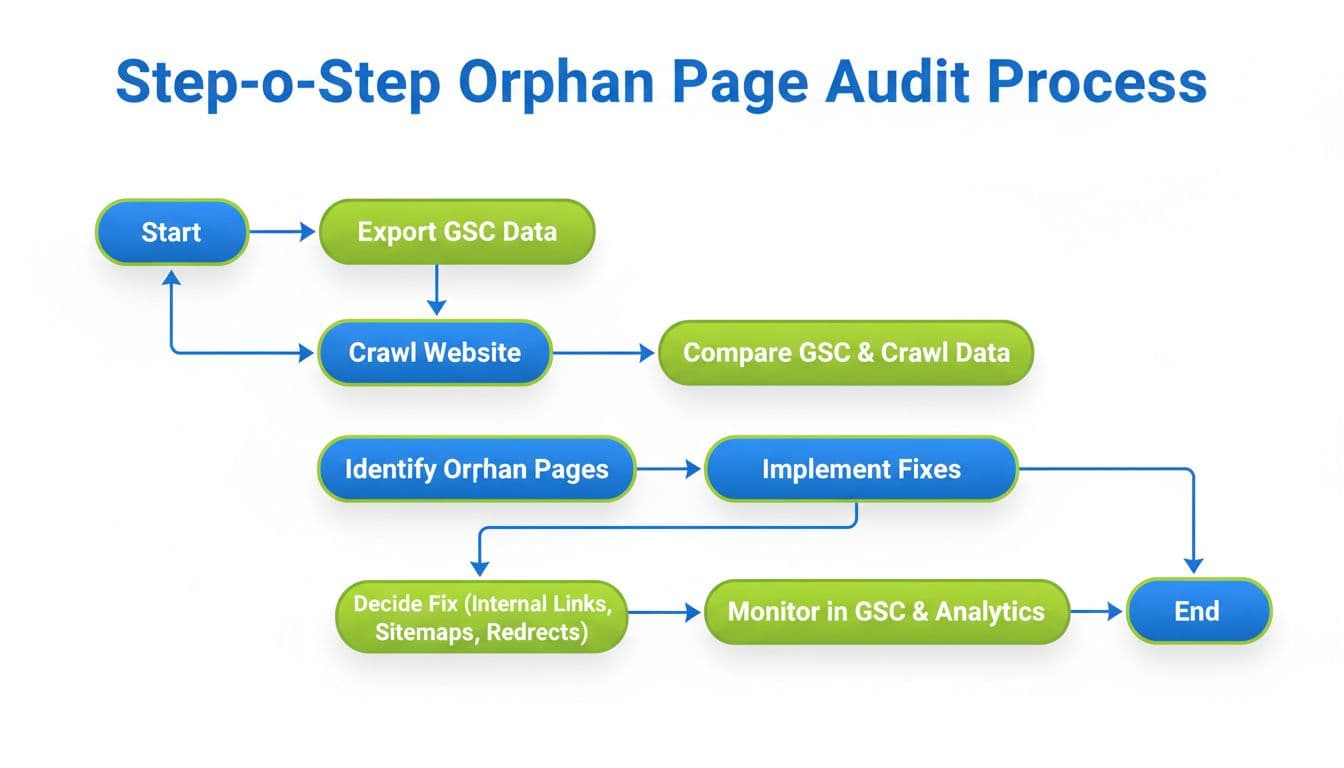
- Export your GSC URL sets: Pull indexed pages, sitemap URLs, and top landing pages from the last 3 to 16 months.
- Run a fresh crawl: Use Screaming Frog, Sitebulb, or another crawler. If you need options, this 2026 site audit tools roundup is a decent place to compare them.
- Compare the lists: URLs seen in GSC but missing from the crawl are your strongest orphan suspects.
- Check business value: Pull sessions, assisted conversions, affiliate clicks, or revenue from analytics.
- Tag the page type: Review, comparison, roundup, expired deal, seasonal page, or info post.
That labeling step matters more than most people think. A hidden “Product A vs Product B” page may deserve links from both product reviews and a comparison hub. Meanwhile, an expired Black Friday coupon page from 2024 might only deserve a redirect to the current deals hub.
For affiliate sites, this is where messy audits usually break. You find an orphan, add a few links, and move on. Then two problems show up. First, the page may overlap with a stronger URL. Second, the page may not deserve rescue at all. If an orphaned roundup and a live roundup chase the same intent, pause and run a content cannibalization audit before you add links.
Also, remember GSC alone won’t catch every bad case. It won’t reveal unindexed orphan pages, thin tag pages blocked from crawl, or URLs hidden behind weak site architecture. That’s why the crawl and analytics checks belong in the same sheet.
How to fix orphan pages without hurting rankings or revenue
Once the suspects are real, use a simple action framework. Think like a shop owner cleaning the back room. Keep what still sells, repair what belongs on the shelf, and toss what expired.
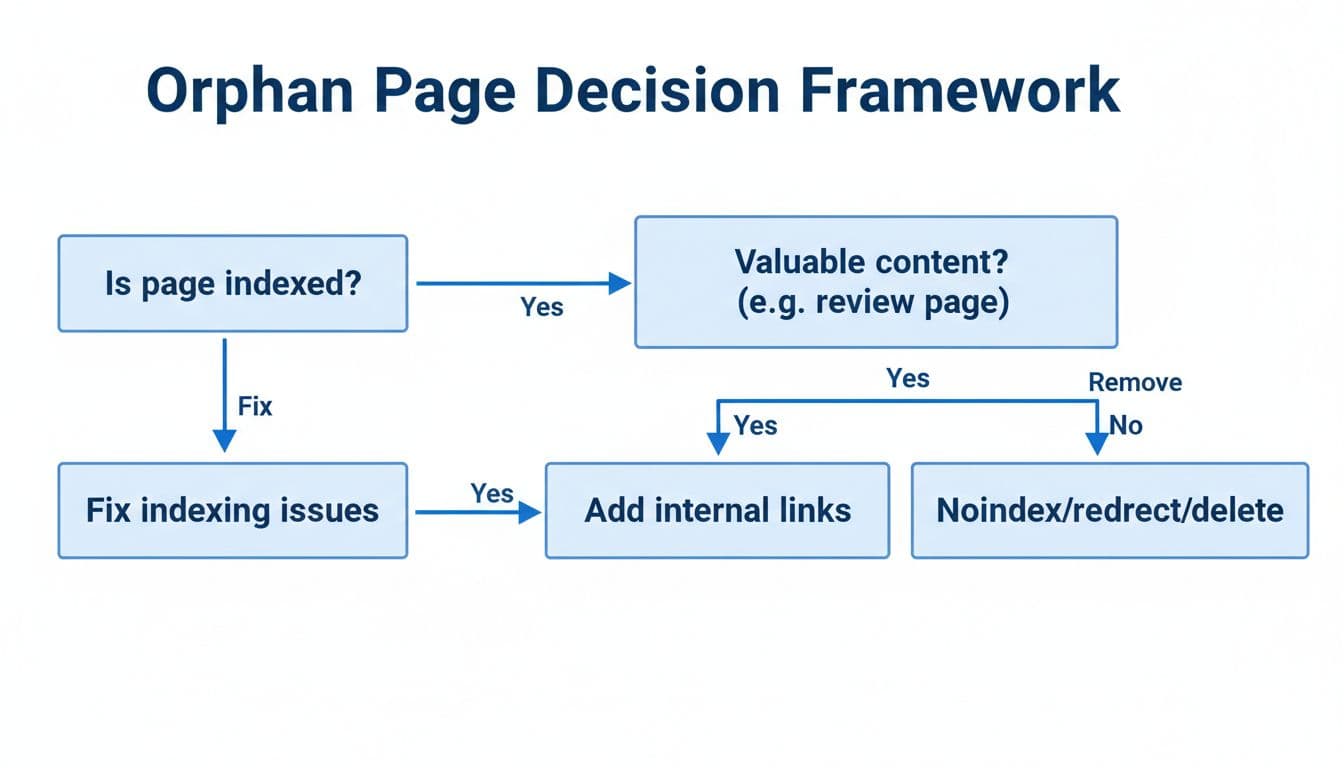
- Add internal links: Do this when the page is current, useful, and matches a real search intent. Link from hub pages, relevant reviews, comparison posts, and roundups. A forgotten hosting review might need links from a “best hosting for beginners” roundup and a migration guide.
- Merge: Use this when a thin orphan page overlaps with a stronger live page. Product roundups and near-duplicate comparisons often fit here.
- 301 redirect: Best for expired deal pages, old coupon URLs, and dead seasonal pages with a clear replacement.
- Noindex or delete: Use this when the page has no real value, no useful links, and no future role.
Keep the fix clean. Add a few strong contextual links, not 20 weak ones in footers or archive pages. Update the sitemap after major changes. Then request indexing only after the page sits inside the site again.
A practical pattern for affiliate sites is hub-and-spoke linking. Your main roundup links to individual reviews, your reviews link to comparison pages, and seasonal pages link back to evergreen hubs. That structure helps both users and Google understand the page’s job.
If you revive an informational orphan and later want to monetize it, use a careful update process. This guide on how to add affiliate links safely is helpful when a recovered page starts attracting buyer intent.
Track the result for 14 to 28 days. Watch impressions, clicks, internal link counts, and conversions. A good fix often starts with better impressions before clicks and sales follow.
A smart orphan page audit is less about finding forgotten URLs and more about deciding which pages still deserve a place in your site. Start with Search Console, but don’t stop there. Compare it with crawl data and analytics, then fix pages by intent, not by guesswork. When you do that, hidden affiliate pages stop acting like storage boxes in the attic and start earning their keep.