
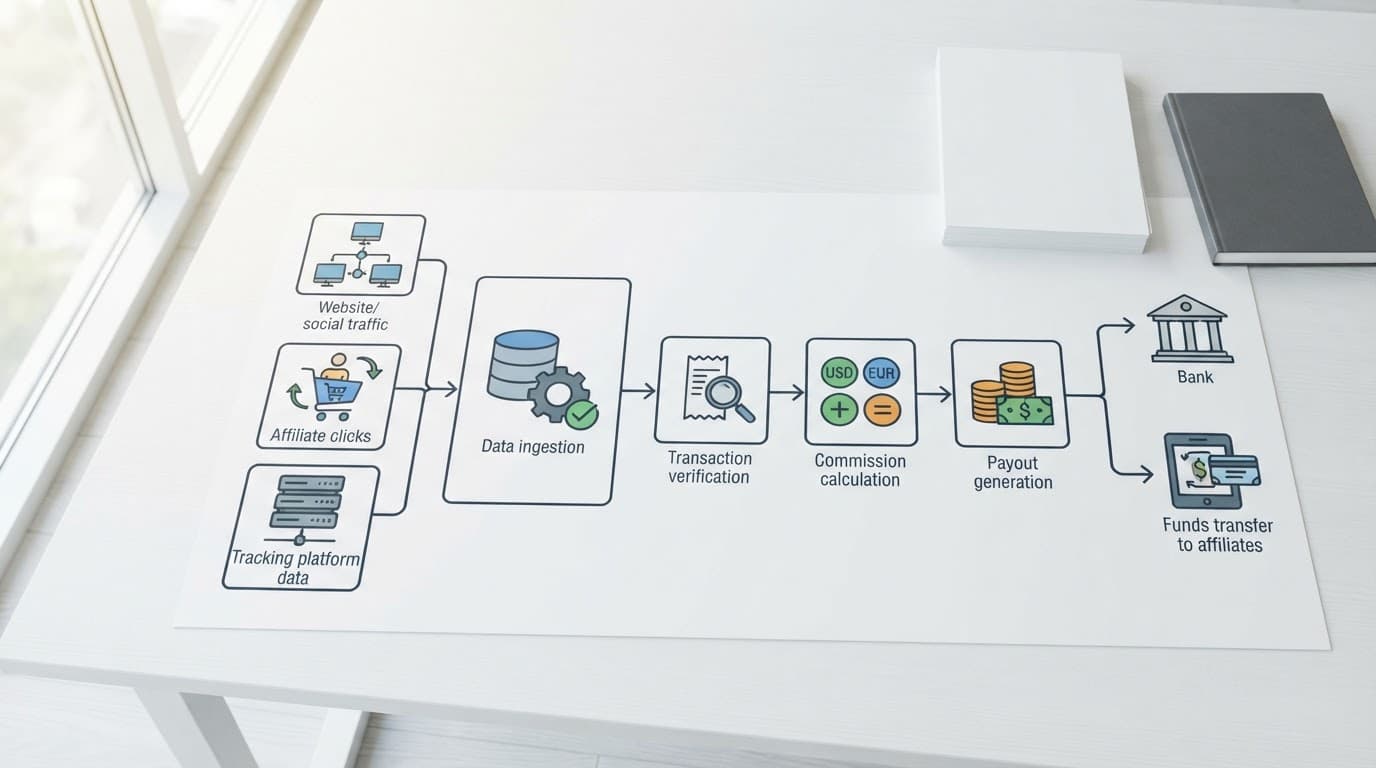
A click report can look healthy while the payout file is wrong. Affiliate payout reconciliation connects the full path, from tracked clicks and recorded sales to approved commissions and money actually paid.
The work is more than comparing two totals. You need matching dates, affiliate IDs, transaction IDs, currencies, attribution rules, and commission statuses. Once those details line up, missing sales and unexplained variances become easier to find.
What affiliate payout reconciliation should prove
A reliable reconciliation answers one basic question: does every payout have support in the underlying tracking and sales records?
That support usually comes from several systems:
- The tracking platform records clicks, sessions, conversion events, and attribution data.
- The affiliate network records transactions, commission amounts, statuses, and payment batches.
- The merchant or ecommerce system confirms orders, refunds, cancellations, and net revenue.
- The finance ledger records approved liabilities and completed payments.
These systems rarely use identical dates or definitions. A sale might occur on January 31, receive approval on February 14, and appear in a March payout because the program has a validation period.
Use a consistent reconciliation key before comparing records. A practical key combines the affiliate ID, transaction ID, offer or program, conversion date, and currency. If a transaction ID is unavailable, use a carefully documented combination of order number, affiliate ID, and timestamp.
The status field also needs a clear meaning:
| Status | What it means | Include in payable balance? |
|---|---|---|
| Tracked | The platform recorded a conversion event | No, not until validated |
| Pending | The sale is waiting for validation or the return window | Usually no |
| Approved | The merchant accepted the sale and commission | Yes |
| Reversed | The sale was canceled, refunded, rejected, or invalidated | No |
| Paid | The approved commission was included in a completed payout | Already paid |
Tracked and pending commissions show potential earnings. Approved commissions create a payable amount. Paid commissions close that liability, while reversed transactions reduce it.
A tracked conversion is evidence of an event, not proof that money is owed.
The same logic applies whether you work in Impact, CJ, Awin, ShareASale, ClickBank, PartnerStack, or an in-house tracking system. Field names differ, but the accounting question stays the same.
Build the data set before comparing totals
Affiliate payout reconciliation becomes unreliable when teams export reports without recording the filters used. Save the reporting period, timezone, currency, status selection, attribution model, and export date with every file.
Start with three separate data sets rather than forcing everything into one report.
The first is a click report. It should contain the click date, affiliate ID, tracking link or campaign, landing page, device or source where available, and unique click count. Clicks help explain traffic and conversion rates, but they don’t establish a commission amount.
The second is a conversion or sales report. Include the transaction ID, order date, affiliate ID, product or offer, gross sale value, refunds, net sale value, commission rate, commission amount, currency, and status.
The third is a payout report. Capture the payout batch ID, payment date, affiliate ID, transaction IDs when available, paid commission, fees, withholding, currency, and payment reference.
Align the following items before using a spreadsheet formula:
- Convert all timestamps to one reporting timezone.
- Use one currency for comparison, or keep separate currency tabs.
- Confirm whether commission rates apply to gross revenue, net revenue, or a defined product subtotal.
- Remove test orders, internal traffic, duplicate events, and transactions outside the reporting period.
- Check whether the network reports approval date while the sales system reports order date.
A mismatch in event definitions can create fake volume. For example, a pageview tag, link-click tag, and server-side click event may count the same visitor more than once. Tight event names, clean filters, and a duplicate-event review can fix a noisy dashboard before it affects payout calculations.
Your affiliate attribution models also matter. A last-click network report won’t match a multi-touch analytics report if both systems assign credit differently.
Use a repeatable matching process
Once the files share the same rules, work through the reconciliation in a fixed order.
First, compare click volume by affiliate, date, campaign, and source. Look for sudden gaps between your tracking platform and the network. A difference doesn’t always mean lost clicks. Networks may filter bots, remove duplicate clicks, or use different definitions of a unique visitor.
Next, match sales by transaction ID. Mark each conversion as one of four outcomes:
- Matched in tracking and the network
- Present in the network but missing from tracking
- Present in tracking but missing from the network
- Present in both systems with different values
Investigate the unmatched records individually. Common causes include delayed server callbacks, an expired cookie, ad blockers, an incorrect sub-ID, duplicate order IDs, and attribution to another channel.
Then compare values. A sale can match by transaction ID while still carrying the wrong commission because the product rate changed, a coupon reduced the commissionable amount, or the order included a non-commissionable item.
Finally, reconcile statuses. Pending transactions shouldn’t be included in the amount due this month. Approved transactions should enter the payable ledger. Reversed transactions need a reversal entry or deduction. Paid transactions should match a payout batch and payment reference.
Keep an exception log with the transaction ID, issue, owner, date found, correction, and final resolution. That record prevents the same discrepancy from being investigated every month.
Create a spreadsheet that shows the money path
A spreadsheet works well when the program is small or when you need an audit layer beside a network dashboard. Keep the raw exports unchanged, then create a working tab with formulas and a separate exceptions tab.
Use columns like these in the working tab:
| Column | Example use |
|---|---|
| Conversion date | Groups transactions by the correct business period |
| Transaction ID | Matches the same order across systems |
| Affiliate ID | Identifies the partner receiving credit |
| Campaign or sub-ID | Explains which link or page generated the sale |
| Gross sale | Records the original order value |
| Refunds | Captures returned or canceled value |
| Net sale | Calculates commissionable revenue |
| Commission rate | Applies the agreed program rate |
| Network commission | Shows the reported amount |
| Status | Separates pending, approved, reversed, and paid |
| Payout batch | Connects paid records to a payment run |
| Variance | Shows the difference between expected and reported values |
For a simple percentage program, adapt these formulas:
Net sale = Gross sale - RefundsExpected commission = Net sale * Commission rateCommission variance = Network commission - Expected commissionApproved unpaid balance = Approved commission - Paid commissionClick-to-sale rate = Sales / Unique clicksEPC = Commission or revenue / Unique clicks
Use a status-aware formula so pending and reversed records don’t inflate the payable total. For example, a spreadsheet formula can calculate payable commission with =IF(OR(Status="Approved",Status="Paid"),ExpectedCommission,0). Adjust the cell references and rate rules for your program.

A practical dashboard should show approved commissions, paid commissions, pending value, reversal value, click-to-sale rate, EPC, and unresolved variance. Keep the first screen short. A finance user needs balances and exceptions, while a content lead needs page-level clicks, conversions, and EPC.
Role-based tabs prevent one crowded report from confusing everyone. A client or owner can see revenue, commissions, top sources, and month-over-month movement. The content team can filter pages that attract clicks but produce no sales. Paid traffic managers also need spend, revenue, and ROAS, because commission data alone doesn’t show campaign profitability.
Explain and fix common payout variances
Not every difference is an error. Your job is to classify it before changing the numbers.
Timing differences happen when order, approval, and payment dates fall in different periods. Reconcile by conversion date for sales performance, approval date for liabilities, and payment date for cash movement. Don’t compare a January click report with a February payout file without documenting that distinction.
Attribution differences occur when tracking tools assign credit to different partners. A coupon site may receive last-click credit while a content affiliate influenced the earlier visit. Review the program’s attribution rule and any override logic before disputing a commission.
Status differences appear when the network has approved a sale but the merchant ledger still marks it pending. Check the export time and validation schedule. A report taken before the nightly update may not contain the latest status.
Value differences often come from refunds, taxes, shipping, discounts, or product-specific rates. Confirm the contract’s commission base. A 10% rate on a $100 commissionable subtotal is different from 10% on a $100 order that includes $20 of excluded items.
Duplicate and missing events point to tracking setup problems. Review transaction IDs, conversion pixels, server-to-server callbacks, and deduplication keys. A duplicate conversion can overstate commissions, while a missing callback can make a valid sale look unpaid.
Program terms matter when reversals or payment delays create disputes. Use an affiliate program checklist to review reversal rules, payment thresholds, holding periods, and reporting access before relying on a program’s headline commission rate.
For the payment side, this related report-matching walkthrough can help finance teams compare transactions with payout records:
Set a monthly reconciliation routine
A repeatable schedule keeps small errors from becoming expensive disputes. Close the period only after the network’s latest status update has arrived, then archive the raw exports.
On the first review, check click totals and conversion counts by affiliate. On the next, match transaction IDs and calculate commission variances. After that, review pending aging, reversals, and payout batches. Any approved commission without a payment reference should remain on the outstanding balance until resolved.
Set a tolerance for minor rounding differences, such as a few cents per transaction, but don’t hide larger variances inside a blanket adjustment. Record the reason, amount, and approval for every manual correction.
Watch for patterns rather than isolated rows. One missing sale may come from a delayed callback. A repeated gap for the same campaign may show a broken tracking parameter. A rising reversal rate may point to low-quality traffic, misleading promotions, or a change in the merchant’s refund policy.
The final report should give each stakeholder a clear answer:
- What traffic and sales did each affiliate generate?
- Which commissions are pending, approved, reversed, or paid?
- What amount remains payable?
- Which records don’t match, and who owns the fix?
- Did the payout batch agree with the approved commission ledger?
Conclusion
Affiliate payout reconciliation works when clicks, conversions, commission statuses, and payment records use the same definitions and time periods. Separate performance reporting from payable accounting, then match transactions before comparing totals.
A clean spreadsheet or dashboard should make every difference traceable. When the money path is visible, you can pay approved commissions accurately, explain reversals clearly, and spot tracking problems before they distort the next payout.